09 · Guide
Print Studio & PDFs
Turn the current project into a readable, customised PDF pattern.
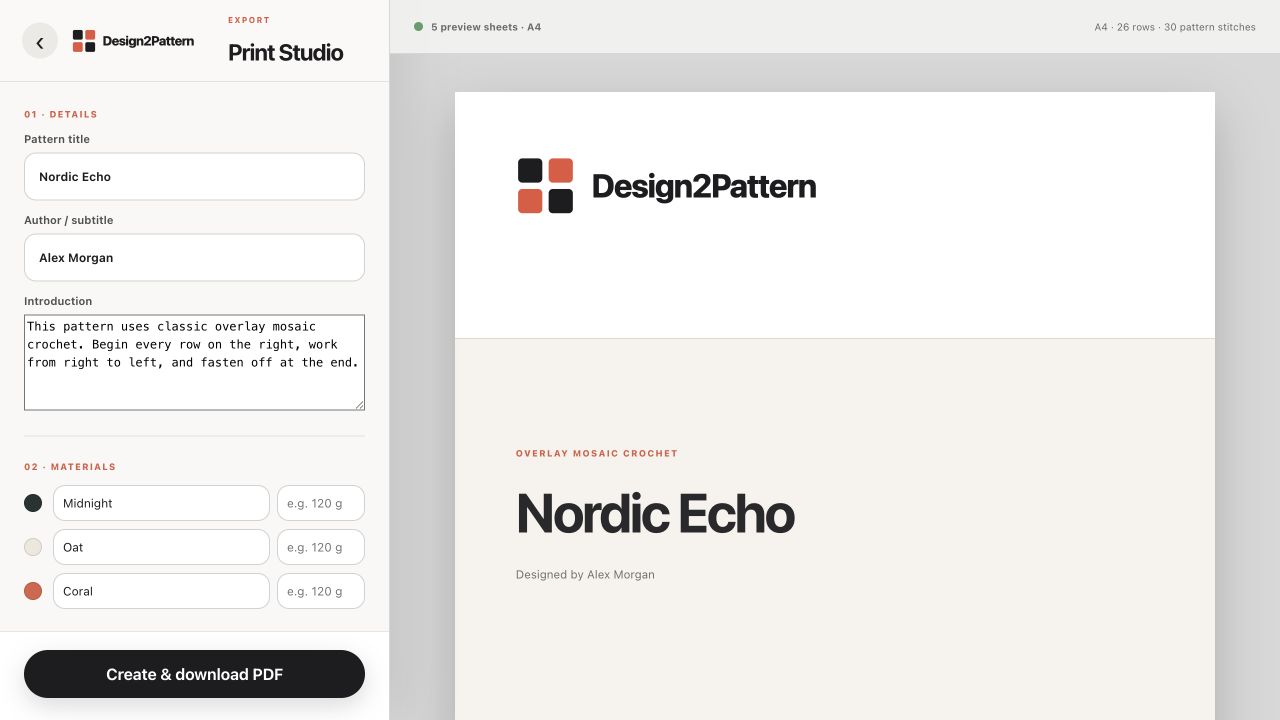
Open Print Studio
Choose “Export PDF” in the editor or the PDF shortcut on a project card. The settings panel is on the left and the live A4 preview is on the right.
Details and introduction
Edit the pattern title, author or subtitle, and introductory paragraph. These fields change the PDF only; they do not rename the project in the editor.
Materials
Every yarn colour used by the row colour plan appears as a material. Rename it if needed and add an amount such as “120 g”. Blank amounts are allowed.
Instructions
The row-by-row instructions are generated from the chart and are fully editable for this export. “Reset” restores the generated text if you want to discard manual changes.
Chart notes and finishing text
The note before the chart explains how to read it. The optional finishing note appears after the chart. Use these areas for pattern-specific advice.
Choose PDF sections
Include or remove the cover page, materials and instructions, and numbered stitch chart. At least one section must remain selected.
Generate and download
Choose “Create & download PDF”. Design2Pattern validates the project, creates the file and adds it to Recent PDFs. Large charts are split across readable A4 pages automatically. Trial exports contain a trial/private-use mark.